Webhook Ingestion
Webhook ingestion is the inbound, asynchronous half of Centrali's webhook story. Use an HTTP trigger to receive third-party events, validate their signatures before your code runs, persist accepted payloads as records, and hand downstream work to functions or automations.
Note
This page covers incoming webhooks from Stripe, Shopify, GitHub, Svix, Clerk, or custom providers. For outbound webhooks that Centrali sends to your customers or partner systems, see Webhooks.
Tip
Need a synchronous request/response API instead of queued webhook processing? Use an Endpoint trigger. Endpoints are the synchronous API surface; HTTP triggers are the async ingest surface.
Why Ingest at the Backend Layer
Verifying signatures, storing payloads, and fanning work out to multiple systems are backend concerns. Handling them once at the platform layer gives you:
- One signature-validation surface instead of bespoke verification code in every service
- A persisted buffer for signature-verified arrivals, with inspection and replay during its retention window
- Optional collection records for searchable business data, separate from the inbound buffer
- Asynchronous processing so the sender gets a fast
2xxwhile your business logic runs on your schedule
The Pattern
Provider webhook
  -> HTTP trigger URL
  -> trigger-layer signature validation
  -> encrypted inbound buffer (verified arrivals)
  -> optional auto-persist to a collection
  -> queued function run
  -> executionParams.payload
  -> record in a collection
  -> automations, queries, search, outbound webhooks
- Create an HTTP trigger with a stable path.
- Configure signature validation on the trigger.
- Enable optional auto-persist or use a small function to normalize and store business records.
- Let Automations or later function runs handle side effects.
When Centrali accepts the request it queues a function run and returns 202 with { "status": "queued" }. Invalid signatures are rejected before your function runs.
Inbound Buffer and Replay
HTTP triggers with successful signature validation persist an arrival before queueing the function. The buffer stores the trigger and function IDs, receipt time, signature result, correlation ID, dispatch status, sanitized headers, and encrypted payload. JSON bodies are stored in parsed form; non-JSON bodies remain strings. This is not a byte-for-byte archive of the original signed HTTP request.
authorization, proxy-authorization, cookie, set-cookie, and configured signature/signature-ID/timestamp headers are stripped before storage. Other headers and payload fields may still contain sensitive data. Payload encryption uses AES-256-GCM; authorized Event Log detail access can expose decrypted payloads.
Only signature-verified arrivals are buffered by the current live HTTP-trigger path. Rejected requests and triggers with signature validation disabled do not create inbound-buffer rows, even though the list API accepts rejected and unsigned filter values. A missing trigger or function also prevents buffering.
Dispatch status describes queue handoff, not function success:
| Status | Meaning |
|---|---|
received | Buffered; queue outcome not recorded. A bookkeeping failure can leave this status after successful queueing. |
queued | Handed to the compute queue |
dropped_dispatch | Queue submission failed; buffered event remains available for manual replay |
dispatched | Worker picked up the job |
A buffer-write failure prevents queueing and returns an error. A queue failure after the write leaves the buffered arrival for investigation. Buffer presence does not promise automatic recovery, exactly-once processing, or successful business logic. Check the function run before replaying an ambiguous received row.
List and replay accepted arrivals
curl -H "Authorization: Bearer YOUR_TOKEN" \
  "https://api.centrali.io/data/workspace/my-workspace/api/v1/inbound-events?limit=50"

curl -X POST -H "Authorization: Bearer YOUR_TOKEN" \
  "https://api.centrali.io/data/workspace/my-workspace/api/v1/inbound-events/ievt_EVENT_ID/replay"
Listing requires workspace retrieve permission on function-triggers; replay requires execute. Replay decrypts the stored payload and re-enters through the original trigger using its current function, code, parameters, and auto-persist configuration. It creates a fresh inbound row and correlation ID, with replayedFrom linking the original. It retains the original signature result rather than verifying a new provider request.
Replay returns 202 after queueing, 404 if the event, trigger, or current function is missing, and 500 for database, decrypt, or queue failures. Replay can duplicate records and side effects. Function Re-run is a separate operation on an existing execution; inbound replay can recover a buffered arrival that never produced a run.
Retention
The inbound buffer defaults to 30 days, configurable by the operator with INBOUND_EVENT_RETENTION_DAYS. A daily retention job deletes expired rows when the scheduler and worker run. Deleted rows cannot be replayed through the inbound API. This setting is independent of function-run history and collection-record retention; a surviving collection record does not keep its original inbound row replayable.
Optional Auto-Persist to a Collection
To write verified arrivals into a collection before function dispatch, set this HTTP trigger metadata alongside signature validation and a signing secret:
The target slug is resolved to a collection ID; the linked target cannot be changed in place. The collection is prepared with reserved fields including encrypted secret-string _payload, _origin, _correlationId, and _inboundEventId. Payload top-level keys matching declared non-secret collection properties are projected as plaintext. Keep sensitive fields inside _payload or explicitly handle them in your own function.
Auto-persist attempts one record write per arrival, independently of function success. Its outcome is recorded as persistStatus and persistedRecordId; failures do not block queueing and have no automatic record-write retry. A replay attempts persistence again under the trigger's current settings and may create another record. The write fails if the collection's _payload property no longer satisfies the secret-string contract.
Auto-persist does not deduplicate provider events. When updating trigger metadata, preserve its autoPersist block: metadata updates replace the block and omission clears the setting. For API details, see Inbound Events.
Idempotency and Duplicate Deliveries
Most webhook providers deliver at least once and retry on failure or timeout. That means your function should assume the same provider event can arrive more than once.
For inbound webhook flows:
- Persist a stable provider event identifier such as Stripe's
event.id - Make the first write idempotent so a retried webhook does not create duplicate records
- Trigger downstream side effects from the stored record or a later automation step, not from fragile in-memory assumptions
If you store first and react later, you get one durable place to deduplicate, inspect, replay, and audit provider events.
URL Shape
Current HTTP trigger URLs use:
Signature Validation
Signature verification is configured on the HTTP trigger, not in your function. By the time your code runs, Centrali has already:
- Read the raw request body
- Extracted signature and optional replay-protection metadata from headers
- Validated the HMAC
- Rejected stale timestamped requests when replay protection is enabled
Your function only receives the parsed request body as executionParams.payload.
Note
As of 6.1, HTTP triggers use the same signature validator as endpoint triggers. You no longer need to switch to an endpoint trigger just to get native signature verification.
Built-in Provider Presets
For common webhook senders, choose a provider preset in the console or set provider in the trigger metadata. Presets fill the header names, signature extraction, digest encoding, secret encoding, and replay defaults for you.
Built-in presets:
svixstripeslackgithubshopify
Use the Svix preset for Svix itself and for providers built on Svix, including Clerk, Resend, Loops, OpenAI, and Brex.
Common Provider Configurations
| Preset | Signature header | Extra headers / replay data | Digest encoding | Notes |
|---|---|---|---|---|
stripe | stripe-signature | Timestamp extracted from the same header via t=(\d+) | hex | Good default for Stripe event endpoints |
shopify | x-shopify-hmac-sha256 | None | base64 | Raw secret |
github | x-hub-signature-256 | None | hex | Extracts sha256=... |
slack | x-slack-signature | x-slack-request-timestamp | hex | Signs v0:{timestamp}:{body} |
svix | svix-signature | svix-id, svix-timestamp | base64 | Uses prefixed-base64 secret decoding |
Any HMAC-based scheme
If your provider is not listed, you can still use Centrali as long as you know the signature header, digest encoding, any signature-id or timestamp headers, and whether the secret should be used raw or decoded from a prefixed value.
Canonical Trigger Metadata
Recommended preset-backed configuration:
{
  "path": "clerk-webhook",
  "validateSignature": true,
  "provider": "svix",
  "signingSecret": "whsec_...",
  "params": {
    "source": "clerk"
  }
}
Advanced raw configuration when no preset fits:
{
  "path": "custom-webhook",
  "validateSignature": true,
  "signingSecret": "whsec_...",
  "signatureHeaderName": "x-custom-signature",
  "signatureIdHeaderName": "x-custom-id",
  "timestampHeaderName": "x-custom-timestamp",
  "timestampExtractionPattern": "^t=(\\d+),",
  "extractionPattern": "^v1=([^,]+)$",
  "hmacAlgorithm": "sha256",
  "hmacEncoding": "hex",
  "secretEncoding": "raw",
  "payloadFormat": "default",
  "replayToleranceSec": 300
}
replayToleranceSec defaults to 300 seconds when you do not override it.
MCP / AI Agent Setup
The MCP create_trigger and update_trigger tools accept the same triggerMetadata shape shown above. Recommended setup flow for AI agents:
- Create the HTTP trigger with
{ path, provider, validateSignature: true } - Register the resulting URL with the upstream provider
- Update the trigger with the provider-issued
signingSecret
Until the secret is set, Centrali rejects requests safely instead of letting unsigned traffic through.
Worked Example: Store Stripe Events as Records
The core pattern is: accept the event, persist it as data, and process it later.
1. Create a Collection
Create a stripe-events collection in schemaless mode so it can accept different Stripe event shapes. After events start landing, use Schema Discovery to promote the fields you care about into visible columns.
2. Write the Function
Create a function called store-stripe-event:
async function run() {
  const event = executionParams.payload;

  const existing = await api.queryRecords("stripe-events", {
    filter: { "data.eventId": event.id },
    pageSize: 1
  });

  if (existing.data.length > 0) {
    return { success: true, duplicate: true, recordId: existing.data[0].id };
  }

  const record = await api.createRecord("stripe-events", {
    eventId: event.id,
    eventType: event.type,
    created: event.created,
    livemode: event.livemode,
    customerId: event.data?.object?.customer,
    amount: event.data?.object?.amount,
    currency: event.data?.object?.currency,
    raw: event,
  });

  return { success: true, recordId: record.data.id };
}
This function does not verify signatures itself. That happens at the trigger layer. Its job is to store the event and expose the fields you'll query later. The lookup avoids an already-stored provider event ID in sequential processing. It is not an atomic deduplication guarantee: concurrent deliveries can both pass the check. Enforce uniqueness or use an atomic idempotency mechanism for the provider event ID before side effects.
3. Create the HTTP Trigger
In the Centrali console, create an HTTP trigger with these settings:
| Setting | Value |
|---|---|
| Name | stripe-webhook |
| Function | store-stripe-event |
| Type | HTTP |
| Path | payments/stripe |
| Validate Signature | On |
| Provider preset | stripe |
| Signing Secret | Stripe endpoint secret (whsec_...) |
| Replay Protection | On (5-minute default tolerance) |
Resolved trigger metadata:
{
  "path": "payments/stripe",
  "validateSignature": true,
  "provider": "stripe",
  "signingSecret": "whsec_..."
}
Resulting URL:
4. Connect Stripe
- In the Stripe dashboard, add the Centrali HTTP trigger URL as a webhook endpoint.
- Select the event types you want.
- Copy the endpoint signing secret from Stripe.
- Paste that secret into the Centrali trigger configuration.
At that point Stripe sends signed requests to Centrali, the trigger validates them, and accepted events arrive in your function as executionParams.payload.
5. Process Asynchronously
Once the raw event is stored, use one of these follow-up patterns:
- Add an Automation that branches on
eventType - Attach event-driven triggers to the
stripe-eventscollection for downstream actions - Query the collection directly for analytics, support tooling, audits, or reconciliation
- Emit your own outbound webhooks after internal processing is complete
Debugging
Diagnostics tab
Open the trigger's Diagnostics tab (Triggers → your trigger → Diagnostics) for a request-level view of what's happening before your function ever runs. The page separates inbound requests from executed runs, so you can see at a glance when a signing secret, timestamp tolerance, or header mapping is rejecting traffic before it reaches your code.
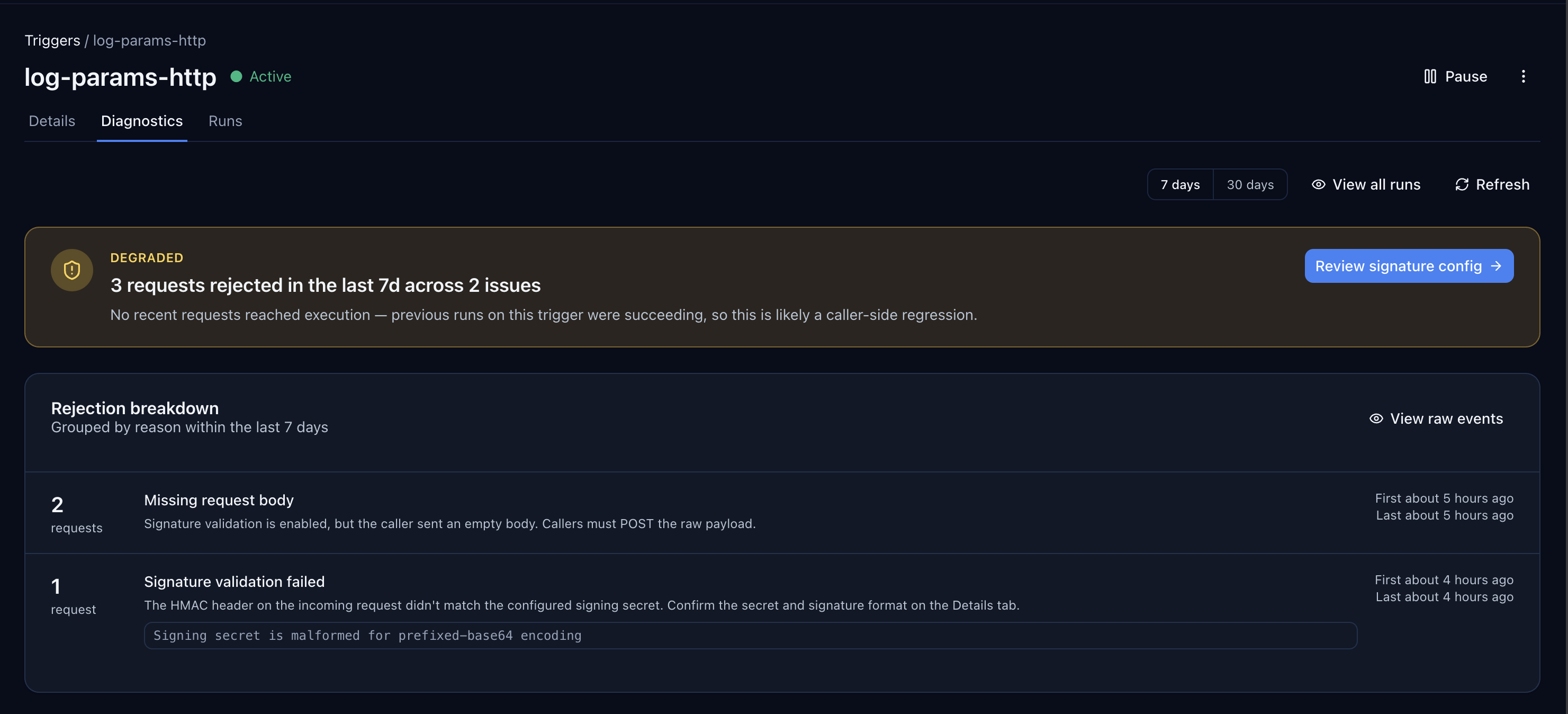
In the screenshot above the trigger is marked Degraded because the last 7 days contain 3 requests rejected across 2 issues (missing request body and signature validation failed). The status banner surfaces the most actionable next step (Review signature config), and the Rejection breakdown panel shows the specific reasons, first/last seen, and the raw backend error — here, a malformed prefixed-base64 signing secret.
Use the Diagnostics tab first when a webhook "isn't working" — it will tell you whether the request was rejected before execution, failed during execution, or never arrived at all.
Other signals
- No function run appears: check both rejection diagnostics and buffered arrivals with
receivedordropped_dispatchstatus. A verified event may have buffered successfully before queue submission failed. The Diagnostics tab will show the reason (signature mismatch, missing body, malformed secret, unknown path). Signature failures return400, and the function is never queued. - The function ran but the data is wrong: inspect the function run details and your
api.log()output.executionParams.payloadis the parsed request body. Persist the full event in arawfield if you want to inspect or query it later. - You need to replay an accepted event: use Inbound Events replay while its buffer row remains available. Use Function Re-run when you specifically want to rerun an existing execution.
- You need to replay a rejected event: replay it from the provider's delivery log or dashboard after fixing the trigger config. Rejected requests never become Centrali runs.
- Your records table only shows system fields: run Schema Discovery after events arrive so fields like
eventType,amount, andcustomerIdbecome visible columns.
What to Read Next
- Need the broader execution model, including endpoint triggers and scheduled triggers? Read Triggers.
- Need the code-level function environment and built-in APIs? Read Functions and Writing Functions.
- Need the exact payload shapes your function receives? Read Trigger Parameters & Payload Shapes.
- Need branching, delays, approvals, or multi-step follow-up work after ingestion? Read Automations.
- Need to inspect or replay buffered arrivals? Read Inbound Events API.
- Need to retry an existing function execution? Read Function Re-run.
- Need Centrali to send webhooks outward after processing? Read Webhooks.
- Want a concrete event-storage example? Read Store Stripe Webhook Events and Query Them Forever.