External Authentication (BYOT)
Use tokens from your existing identity provider (Clerk, Auth0, Okta) to authorize Centrali API requests—no user duplication required.
Overview
BYOT (Bring Your Own Token) lets you pass JWTs from external identity providers directly to Centrali. We validate the token and use its claims for authorization decisions.
┌─────────────────────────────────────────────────────────────────┐
│                        Your Application                          │
├─────────────────────────────────────────────────────────────────┤
│  User signs in via Clerk/Auth0/Okta                             │
│  Gets JWT: { sub: "user_123", plan: "premium", role: "admin" }  │
└─────────────────────────────────────────────────────────────────┘
                              │
                              │ JWT Token
                              ▼
┌─────────────────────────────────────────────────────────────────┐
│                          CENTRALI                                │
├─────────────────────────────────────────────────────────────────┤
│  1. Validate JWT signature via JWKS                             │
│  2. Extract claims → ext_plan, ext_role                         │
│  3. Evaluate policy: IF ext_plan == "premium" THEN Allow        │
│  4. Return Allow/Deny                                           │
└─────────────────────────────────────────────────────────────────┘
Benefits: - Use your existing IdP (no user migration) - Policy-based authorization using JWT claims - No data synchronization required - Works with any OIDC-compliant provider
Quick Start
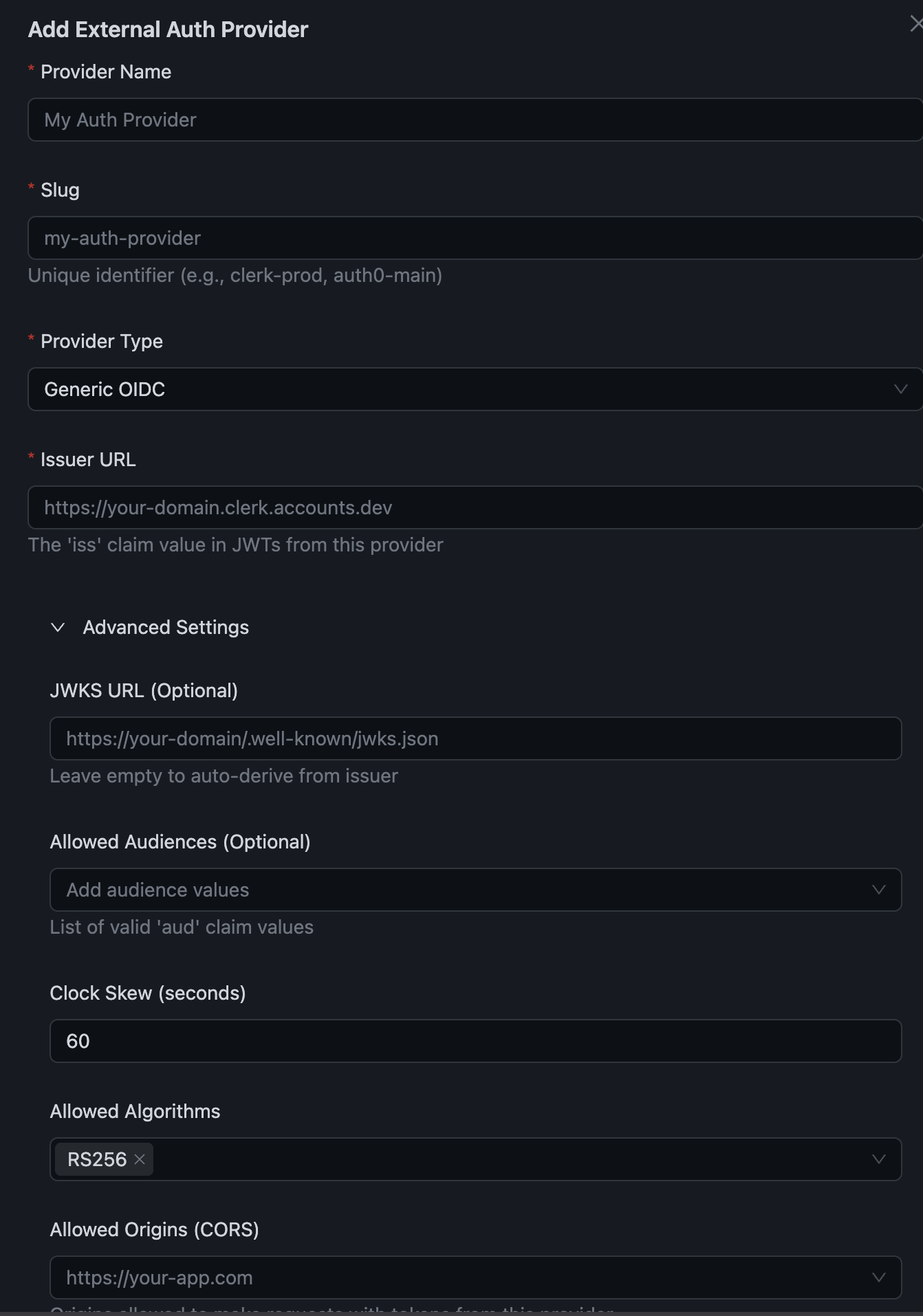
Step 1: Add External Auth Provider
In the Centrali Console:
- Go to Settings → External Authentication Providers
- Click Add Provider
- Configure your provider:
| Field | Description |
|---|---|
| Provider Name | Display name (e.g., "Clerk Production") |
| Provider Type | Select your IdP (Clerk, Auth0, Generic OIDC) |
| Issuer URL | Your IdP's issuer URL |
| Allowed Audiences | Expected aud claim values |
| Claim Mappings | Map JWT claims to policy attributes |
Step 2: Configure Claim Mappings
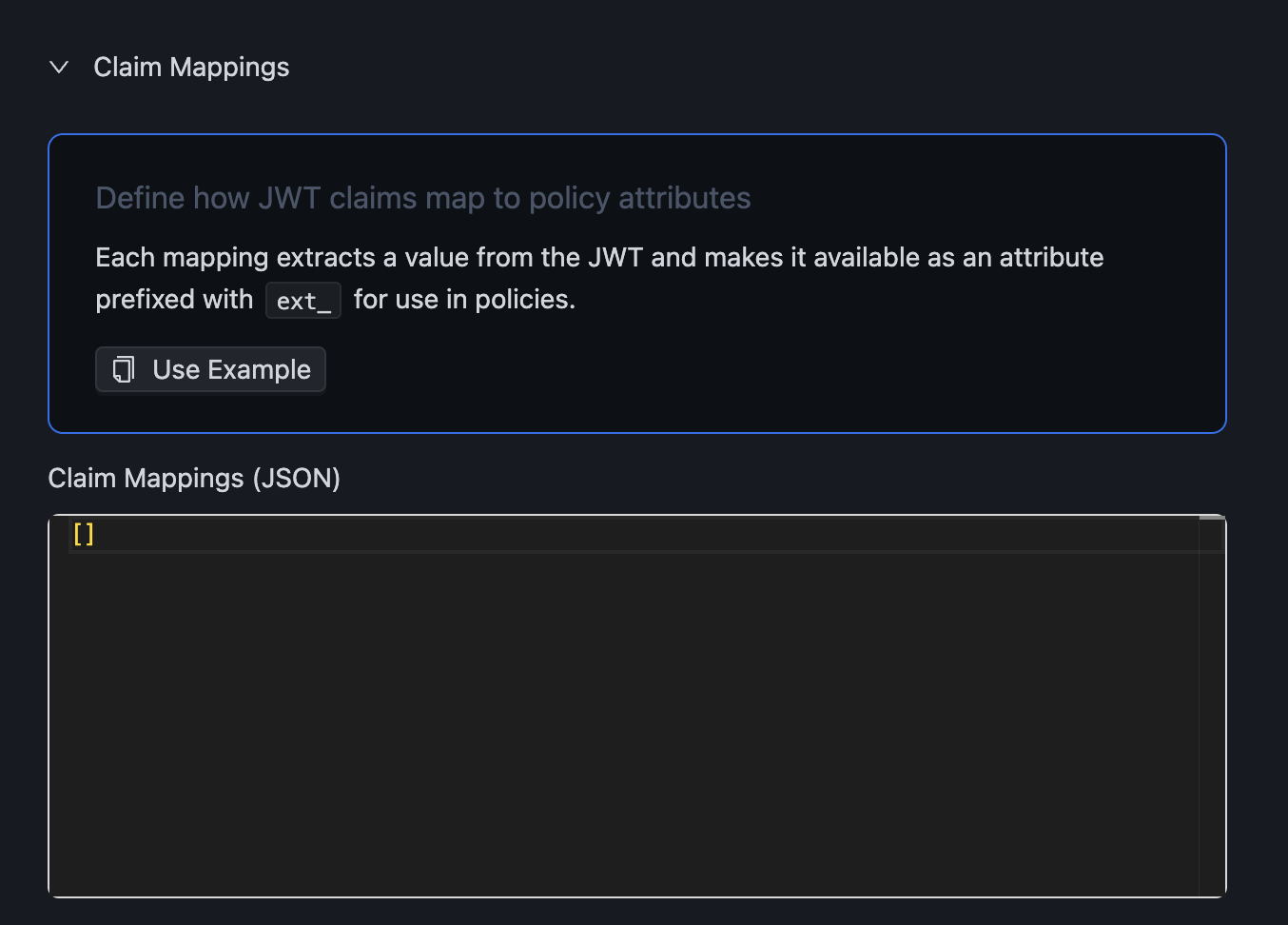
Claim mappings define which JWT claims become available in your policies:
[
  {
    "jwtPath": "org_role",
    "attribute": "role",
    "required": false
  },
  {
    "jwtPath": "metadata.plan",
    "attribute": "plan",
    "required": false,
    "defaultValue": "free"
  }
]
Each mapping: - jwtPath: Path to the claim in the JWT (supports dot notation) - attribute: Name used in policies (becomes ext_<attribute>) - required: Whether authorization fails if claim is missing - defaultValue: Value to use if claim is missing
Step 3: Create a Policy
Write policies using the extracted claims (prefixed with ext_):
{
  "name": "premium_access",
  "specification": {
    "rules": [{
      "rule_id": "premium-allow",
      "effect": "Allow",
      "conditions": [
        { "function": "string_equal", "attribute": "ext_plan", "value": "premium" }
      ]
    }],
    "default": { "effect": "Deny" }
  }
}
Step 4: Check Authorization
Use the SDK to check authorization with your external token:
import { CentraliSDK } from '@centrali-io/centrali-sdk';

const centrali = new CentraliSDK({
  baseUrl: 'https://api.centrali.io',
  workspaceId: 'your-workspace',
});

// Get token from your IdP (e.g., Clerk)
const token = await getToken({ template: 'centrali' });

// Check authorization
const result = await centrali.checkAuthorization({
  token,
  resource: 'premium-features',
  action: 'access',
});

if (result.data.allowed) {
  // User has access
}
Passing Context
Include request-specific data in authorization decisions using the context parameter:
const result = await centrali.checkAuthorization({
  token,
  resource: 'orders',
  action: 'approve',
  context: {
    orderId: 'order-123',
    orderAmount: 50000,
    department: 'sales',
  },
});
Access context values in policies using request_metadata with metadata_key:
{
  "name": "approval_limits",
  "specification": {
    "rules": [
      {
        "rule_id": "manager-high-value",
        "effect": "Allow",
        "conditions": [
          { "function": "string_equal", "attribute": "ext_role", "value": "manager" },
          {
            "function": "integer_greater_than",
            "attribute": "request_metadata",
            "metadata_key": "orderAmount",
            "value": 10000
          }
        ]
      },
      {
        "rule_id": "anyone-low-value",
        "effect": "Allow",
        "conditions": [
          {
            "function": "integer_less_equal",
            "attribute": "request_metadata",
            "metadata_key": "orderAmount",
            "value": 10000
          }
        ]
      }
    ],
    "default": { "effect": "Deny" }
  }
}
This policy: - Managers can approve orders over $10,000 - Anyone can approve orders $10,000 or less - All other cases are denied
Available Attributes
External Token Attributes
| Attribute | Type | Description |
|---|---|---|
ext_* | any | Claims extracted via your claim mappings |
is_external_principal | boolean | Always true for external tokens |
external_issuer | string | JWT issuer URL |
external_subject | string | JWT subject claim |
Context Attributes
| Attribute | Type | Description |
|---|---|---|
request_metadata | object | The context object you pass |
request_metadata.<key> | any | Nested values via metadata_key |
Standard Attributes
| Attribute | Type | Description |
|---|---|---|
action | string | The action being performed |
ip_address | string | Request IP address |
current_time | string | Current time (HH ss) ss) |
date | string | Current date (YYYY-MM-DD) |
day_of_week | string | Day name (Monday, etc.) |
is_weekend | boolean | Saturday or Sunday |
Use Cases
1. Plan-Based Feature Gating
{
  "name": "enterprise_features",
  "specification": {
    "rules": [{
      "rule_id": "enterprise-allow",
      "effect": "Allow",
      "conditions": [
        { "function": "string_one_of", "attribute": "ext_plan", "values": ["enterprise", "premium"] }
      ]
    }],
    "default": { "effect": "Deny" }
  }
}
2. Role-Based Access Control
{
  "name": "admin_only",
  "specification": {
    "rules": [{
      "rule_id": "admin-allow",
      "effect": "Allow",
      "conditions": [
        { "function": "string_equal", "attribute": "ext_role", "value": "admin" }
      ]
    }],
    "default": { "effect": "Deny" }
  }
}
3. Organization Isolation
{
  "name": "org_data_access",
  "specification": {
    "rules": [{
      "rule_id": "same-org",
      "effect": "Allow",
      "conditions": [
        {
          "function": "string_equal",
          "attribute": "ext_org_id",
          "value": "{{$request_metadata.resourceOrgId}}"
        }
      ]
    }],
    "default": { "effect": "Deny" }
  }
}
4. Authorization-as-a-Service
Use Centrali purely for authorization decisions without storing data:
// Check permission in YOUR system using Centrali policies
const canApprove = await centrali.checkAuthorization({
  token: clerkJWT,
  resource: 'expense-reports',  // Your custom resource
  action: 'approve',
  context: {
    amount: expenseReport.amount,
    submitterId: expenseReport.submitterId,
  },
});

if (canApprove.data.allowed) {
  // Handle approval in YOUR database
  await yourDb.approveExpense(expenseReport.id);
}
Security
Token Validation
Centrali validates external tokens by:
- Signature verification via JWKS from your provider
- Issuer validation - must match registered provider
- Audience validation - must match allowed audiences
- Expiration check - token must not be expired
- Algorithm validation - only RS256 allowed
Restricted Resources
External principals cannot access administrative resources:
workspace::users- User managementworkspace::groups- Group managementworkspace::roles- Role managementworkspace::service-accounts- Service accountsworkspace::security- Security settingsbilling- Billing management
Supported Providers
| Provider | Type | JWKS Auto-Discovery |
|---|---|---|
| Clerk | clerk | Yes |
| Auth0 | auth0 | Yes |
| Okta | okta | Yes |
| Generic OIDC | oidc | Yes |
For detailed setup instructions, see the integration guides:
Troubleshooting
"Unknown issuer" Error
The JWT issuer doesn't match any registered provider.
Solution: Verify your provider's issuer URL matches the configuration.
"Token validation failed"
JWT signature verification failed.
Solution: - Check JWKS URL is accessible - Verify token hasn't expired - Ensure correct audience is configured
Claims Not Available
Claim mappings don't match JWT structure.
Solution: - Decode your JWT at jwt.io to see actual claims - Verify jwtPath matches the JWT structure - Use dot notation for nested claims (e.g., metadata.plan)
"Access Denied"
Policy conditions not matching.
Solution: - Check attribute values are exact matches (case-sensitive) - Verify policy is attached to the correct resource - Check ext_ prefix is used in policies
Related Documentation
- Clerk Integration Guide - Step-by-step Clerk setup
- Policies and Permissions - Policy syntax reference
- Authentication Overview - All auth methods
- SDK Guide - Using the Centrali SDK